Appearance
Last review: Jan 17,2026
Need updates
While developing my C2 (Command & Control), I needed to open terminals and send commands from a script. This led me to learn more about tty, pty, and pts.
TTY
Historically, a TTY represents a physical terminal, which consists of an input device (a keyboard), a monitor, and the logic that connects them. On Linux, a TTY is represented by a file corresponding to a character device.
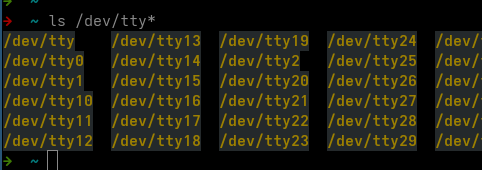
At a high level, writing to such a file means 'calling a kernel function to display something on the monitor.'
The kernel function represents the logic that connects the monitor and the keyboard. It can intercept and manipulate data.
Reading is the opposite process, occurring from the keyboard.
pty and pts
As a Linux user, I learned that each time we open a terminal, such as Terminator, a new file /dev/pts/X is created. It is possible to get the name of this file using the tty command:

From another terminal, if we write to it, we can send text to the first terminal:
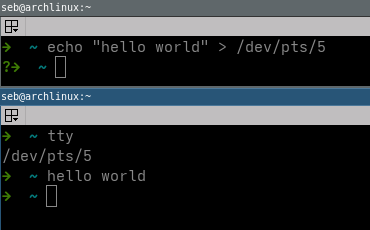
This is expected behavior, similar to a TTY, since writing to such a file means 'calling a kernel function to display something on the monitor.'
However, this gives the intuition that we could execute commands in one terminal from another.
By experimenting with this idea, we observe that the command is not actually executed:
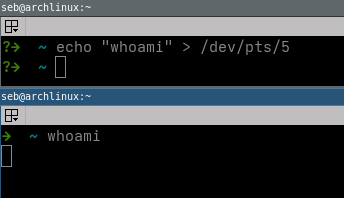
To understand why, we need to understand PTY (Pseudo-TeleTYpe).
While a PTY looks like a TTY, the difference lies in the fact that a PTY is created and controlled by a userspace program and behaves like a special pipeline that can intercept and modify data.
A PTY is split into two parts: a master and a slave, the latter being called a PTS (Pseudo-TeleTYpe Slave).
One can easily create a PTY with the following Python script:
python
import pty
import os

master_fd, slave_fd = pty.openpty()

print("Master FD:", master_fd)
print("Slave FD:", slave_fd)
print("Master device:", os.ttyname(master_fd))
print("Slave device:", os.ttyname(slave_fd))
This results in the following output:
➜  /tmp python3 a.py
Master FD: 3
Slave FD: 4
Master device: /dev/ptmx
Slave device: /dev/pts/4
At this stage, we have built a pseudo-terminal—a kind of small Terminator—without an associated shell, which prevents any command execution. To link a shell to our terminal, we can slightly modify the previous Python script as follows:
python
import os
import pty

master_fd, slave_fd = pty.openpty()
print(os.ttyname(slave_fd))

pid = os.fork()
if pid == 0:
    os.setsid()
    os.dup2(slave_fd, 0) # stdout
    os.dup2(slave_fd, 1) # stdin
    os.dup2(slave_fd, 2) # stderr
    os.execvp("bash", ["bash"])
else:
    os.close(slave_fd)
    while True:
        print(os.read(master_fd, 1024).decode(errors="ignore"), end="")
When we write to the PTS created by the previous code, we observe that something is read from the master device:
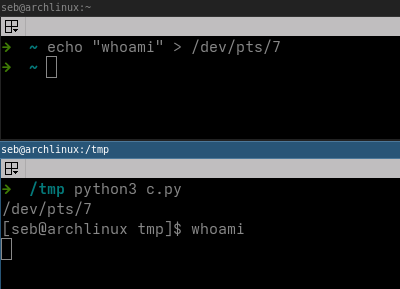
Thus, writing to /dev/pts/X tells the kernel to send data to master_fd rather than to the slave.
In order to send data to the shell, our program needs to write to master_fd:
python
import os
import pty

master_fd, slave_fd = pty.openpty()
print(os.ttyname(slave_fd))

pid = os.fork()
if pid == 0:
    os.setsid()
    os.dup2(slave_fd, 0)
    os.dup2(slave_fd, 1)
    os.dup2(slave_fd, 2)
    os.execvp("bash", ["bash"])
else:
    os.close(slave_fd)
    os.write(master_fd,b"whoami\n")
    while True:
        print(os.read(master_fd, 1024).decode(errors="ignore"), end="")
➜ /tmp python3 c.py
/dev/pts/7
whoami
[seb@archlinux tmp]$ whoami
sebThe input path is the following:
- Data is written to the master part of the PTY. This sends the data to the kernel.
- The kernel processes the data. For example, if it receives
\x03 (Ctrl-C), it kills the process. If it receives simple text, it sends it to the slave part of the PTY. - The slave part of the PTY forwards the data to the stdin of the shell, which can then execute the command.
The output path is the following
- Data is written to the stdout of the shell, which is forwarded to the slave part of the PTY. The PTY then sends the data to the kernel. This is equivalent to doing
echo "whoami" > /dev/pts/X - The kernel processes the data and returns it to the master part of the PTY
- Our pseudo-terminal reads the result from the file descriptor that represents the master part
At a low level, writing to a character device (such as /dev/pts/X) means calling a specific kernel function. There is another way to manipulate /dev/pts/X: ioctl(fd, TIOCSTI, ...), which injects characters into the terminal input queue. Note, however, that this is not equivalent to writing to the master part of the PTY, at least because it does not go through the so-called 'line discipline.'