Appearance
Last review: Sept 15,2025
I decided to turn my Raspberry Pi into a Bluetooth keyboard and mouse. In this article, I’ll share my understanding of how to emulate these devices. There are still some aspects I don’t fully understand, but I plan to update this article as I learn more.
HID
HID stands for Human Interface Device. Any device that allows a human to send input to a computer is considered an HID. For example, a mouse, keyboard, and joystick are all HIDs.
The Bluetooth specification categorizes devices into classes based on common properties, and HID devices form one such class.
Bluez
Since I want to emulate a Bluetooth HID device, I will use BlueZ, the Bluetooth stack for Linux.
If you're familiar with Linux, you’ve probably encountered the Bluetooth service:
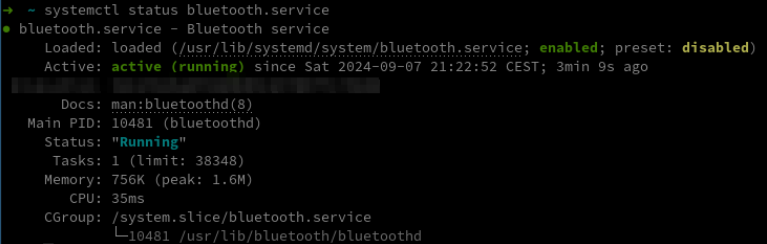
Once the service is running, you can interact with it using the bluetoothctl command.
For example, you can discover available devices by running the scan on command. The following screen shows my device.
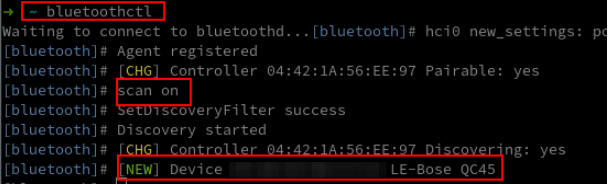
Now, let's try connecting to this device using the command connect [MAC]:

As you can see, the connection failed. This is expected because you need to pair with the device first using the pair command before you can connect to it.
For now, just take note of the error message. You might notice the unusual string org.bluez.Error.Failed.
This suggests that BlueZ uses D-Bus. But wait… what is D-Bus?
DBUS
On Linux, processes can communicate in various ways, such as through sockets, shared memory, named pipes, or… D-Bus!
You can think of D-Bus as a virtual message bus where multiple processes connect to send and receive messages from each other.
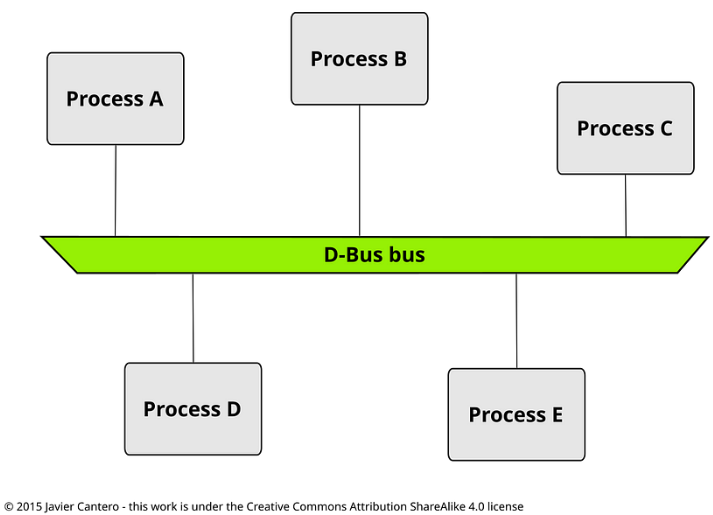
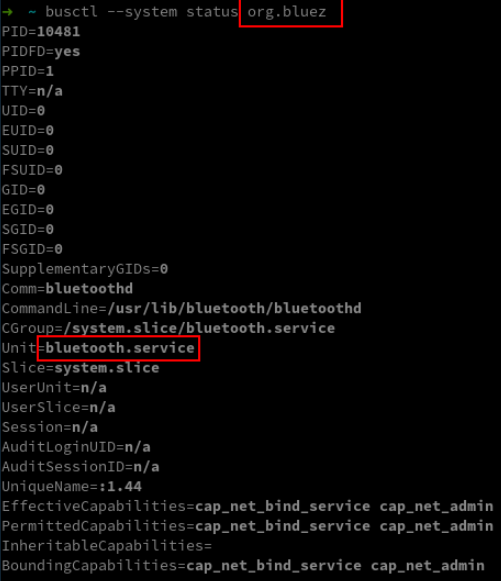
Each process is identified by a 'well-known bus name.' From the previous error, we can see that org.bluez is the well-known bus name for the Bluetooth service.
This can be confirmed using the busctl command:
Objects and Interfaces
org.bluez refers to the Bluetooth service on D-Bus. The service exposes multiple objects, each named with a Linux-like path. For example, the well-known bus org.bluez has an object called /org/bluez.

Each object has multiple interfaces.
Here are some examples of interfaces provided by the object '/org/bluez':
- org.bluez.Agent
- org.bluez.Adapter
- org.bluez.ProfileManager1 (https://github.com/bluez/bluez/blob/master/doc/org.bluez.ProfileManager.rst)
Finally, each interface provides functions that we can use to communicate with BlueZ.
Specifications documents
Being able to communicate with bluez is not enough. There is no magical functions to emulate a HID device. We need to go a little bit further and read the bluetooth specifications.
Bluetooth
Being able to communicate with BlueZ is not enough. There are no magical functions to emulate an HID device.
We need to go a step further and refer to the Bluetooth specifications.

SPD
An important aspect that will help us tell BlueZ we want to emulate an HID device is the SDP.
The Bluetooth specification defines it as follows:
SDP database which consists of a list of service records that describe the characteristics of services associated with the server. Each service record contains information about a single service.
All of the information about a service that is maintained by an SDP Server is contained within a single service record. The service record shall only be a list of service attributes.
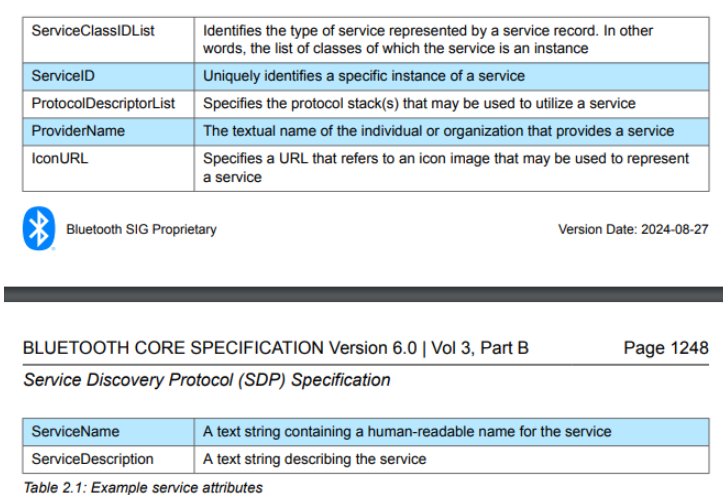
An attribute ID is a 16-bit unsigned integer
A service class definition specifies each of the attribute IDs for a service class and assigns a meaning to the attribute value associated with each attribute ID. Each attribute ID is defined to be unique only within each service class
A service record contains attributes that are specific to a service class as well as universal attributes that are common to all services
SDP attributes are split into two categories: Universal attributes and Specific attributes.
What you need to remember is that an SDP record describes a device through a list of attributes. This is defined using an XML file:
XML
<?xml version="1.0" encoding="UTF-8" ?>

<record>
	<attribute id="ID1">
        VALUE 1
	</attribute>

	<attribute id="ID2">
        VALUE 2
	</attribute>
</record>
The question then becomes: which attributes should we use, and for each attribute, what kind of values can we assign?
attributes ID
Universal attributes are defined in the Bluetooth specification under 'Assigned Numbers,' in section 5.1.5, 'Bluetooth Core Specification: Universal Attributes.
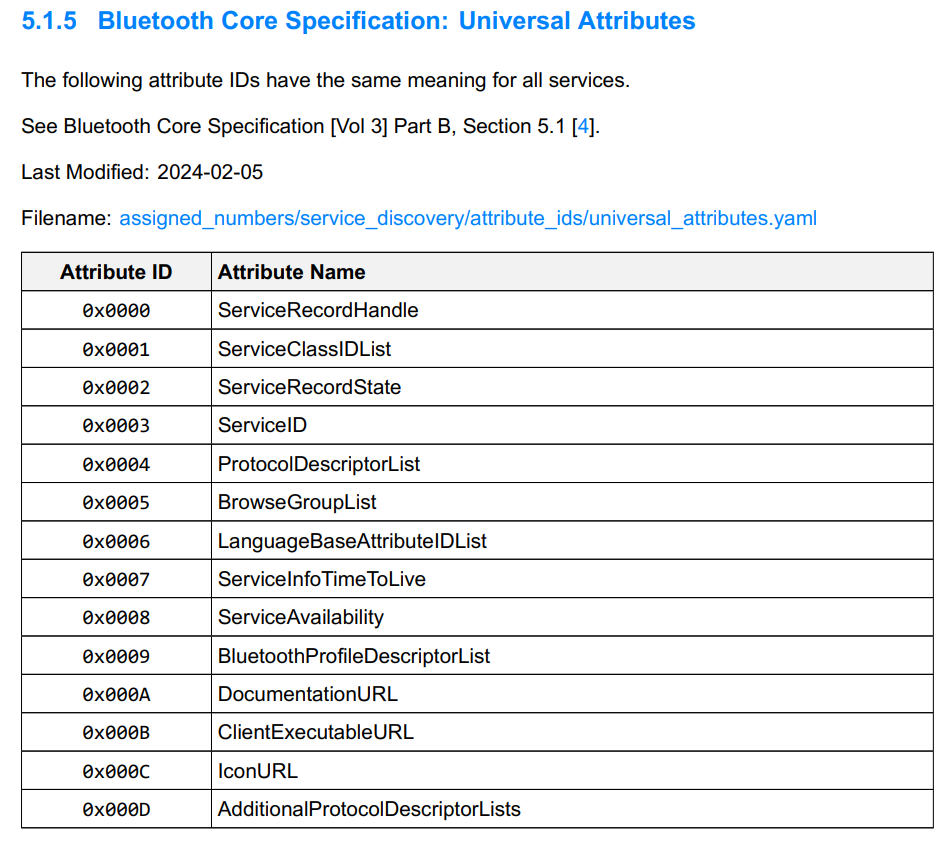
ServiceClassIDList (0x0001)
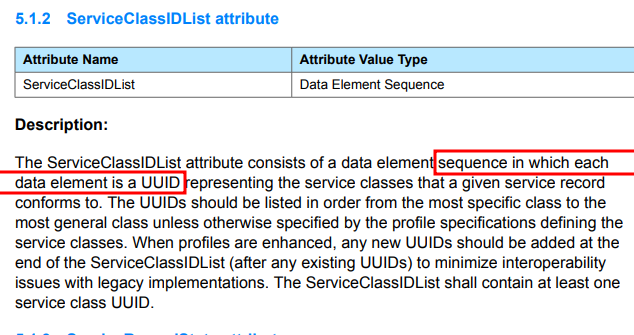
This attribute allows us to specify the class of the HID. The value is a sequence of UUIDs
XML
<attribute id="0x0001"> <!-- This is the attribute for specifying a class ID List -->
		<sequence>
			<uuid value="0x1124" /> <!-- This describe a Human Interface Device -->
		</sequence>
</attribute>
ProtocolDescriptorList (0x0004)
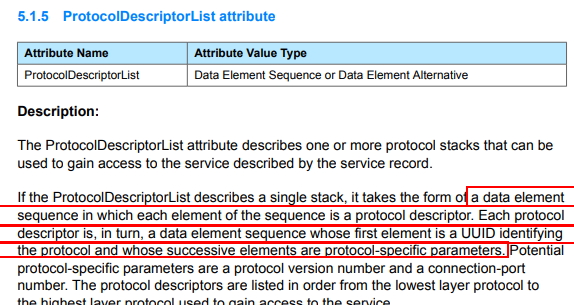
This attribute allows us to specify the protocol used. In this case, we will use the Logical Link Control and Adaptation Protocol (L2CAP):
XML
<attribute id="0x0004"> <!-- Protocol Descriptor List -->
	<sequence>
		<sequence>
			<uuid value="0x0100" /> <!-- use the L2CAP protocol -->
		</sequence>
	</sequence>
</attribute>
HIDDescriptorList (0x0206)
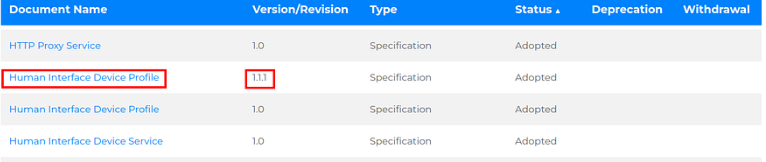
The Bluetooth Human Interface Device Profile (HIDP) 1.1 specification provides the details of this attribute.
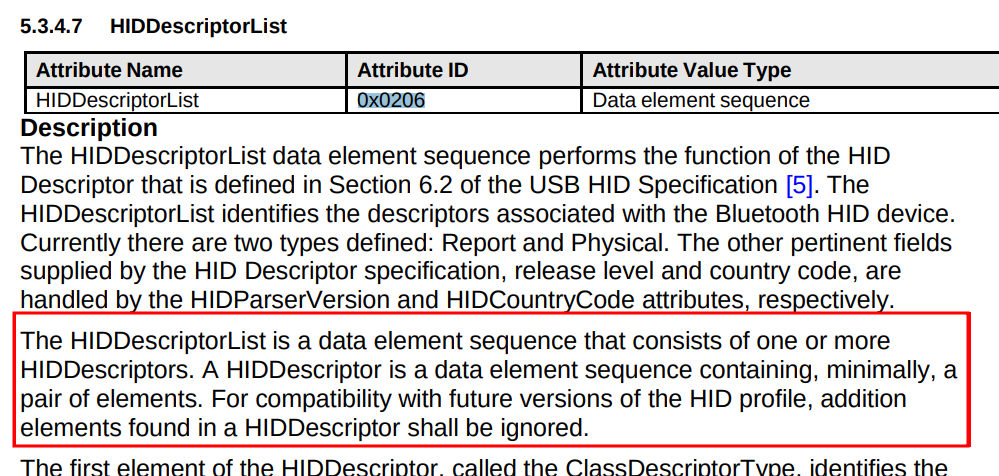
XML
        <attribute id="0x0206">
                <sequence>
                        <sequence>
                                <uint8 value="0x22" />
                                <text encoding="hex" value="05010906a101850175019508050719e029e715002501810295017508810395057501050819012905910295017503910395067508150026ff000507190029ff8100c005010902A10185020901A1000509190129031500250175019503810275059501810105010930093109381581257F750895038106C0C0"/>
                        </sequence>
                </sequence>
        </attribute>
The long chain 05010906... is an HID descriptor, but it requires further clarification. To understand it better, we need to take a closer look at the USB specification, which inspired the Bluetooth HID descriptor.
HID descriptor
An HID descriptor defines how data is transferred between the device and the computer.
For example, it tells the computer that the connected device is a mouse with two buttons and two axes. Since the mouse transfers data through a frame of bits, the HID descriptor also specifies which parts of the frame correspond to the buttons and which parts correspond to the axes.
An HID descriptor is essentially a list of items. Here, we'll focus specifically on short items:
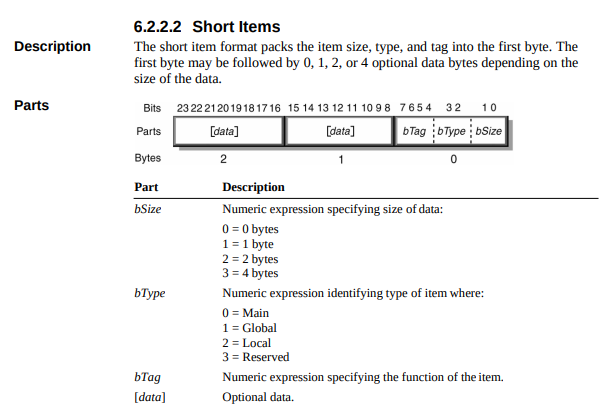
As the figure shows, each item has a type (Main, Global, and Local) and a tag, which depends on the type.
You can think of the type as a category, and the tag as a subcategory.
For example, the following figure shows the five tags for the Main type:
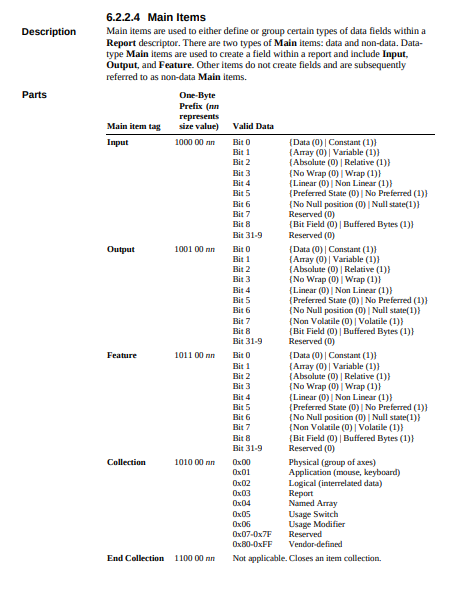
The following table summarizes all of these values. nn represents the size of the record, excluding the first prefix byte.
| Main (xxxx 00 nn) | Global(xxxx 01 nn) | Local (xxxx 10 nn) |
|---|---|---|
| Input (1000 00 nn : 0x80 -> 0x83) | Usage Page (0000 01 nn : 0x04 -> 0x06) | Usage (0000 10 nn : 0x08 -> 0x0a) |
| Output (1001 00 nn : 0x90 -> 0x92) | Logical Minimum (0001 01 nn : 0x14 -> 0x16) | Usage Minimum (0001 10 nn : 0x18 -> 0x1a) |
| Feature (1011 00 nn : 0xb0 -> 0xb2) | Logical Maximum (0010 01 nn : 0x24 -> 0x26) | Usage Maximum (0010 10 nn : 0x28 -> 0x2a) |
| Collection (1010 00 nn : 0xa0 -> 0xa2) | Physical Minimum (0011 01 nn : 0x34 -> 0x36) | |
| End of Collection( 1100 00 nn : 0xc0 -> 0xc2) | Physical Maximum (0100 01 nn : 0x44 -> 0x46) | |
| Report Size (0111 01 nn : 0x74 -> 0x76) | ||
| Report ID (1000 01 nn : 0x84 -> 0x86) | ||
| Report Count (1001 01 nn : 0x94 -> 0x96) | ||
| Report Push (1010 01 nn : 0xa4 -> 0xa6) | ||
| Report Pop (1011 01 nn : 0xb4 -> 0xb6) |
With all that in mind, I created the following Python script (it might contain bugs) to parse my HID descriptor
python
hid_descriptor=bytes.fromhex("05010906a101850175019508050719e029e715002501810295017508810395057501050819012905910295017503910395067508150026ff000507190029ff8100c005010902A10185020901A1000509190129031500250175019503810275059501810105010930093109381581257F750895038106C0C0")

i=0
err = False
while(i<len(hid_descriptor)):
    bSize=hid_descriptor[i]&3
    bType=(hid_descriptor[i]>>2)&3
    bTag=(hid_descriptor[i]>>4)&15

    if( (bSize == 0b10) and (bType == 0b11) and bTag == 0b1111):
        print("Long item detected")
        print("Not implemented yet. Check the USB Device Class Definition for Human Interface Devices (HID) Specification")
        exit(0)
    else:
        print(f"Short item of size {bSize}.", end=" ")
        if(bType==0):
            print("Main type.", end=" ")
            if(bTag == 0b1000):
              print("Input tag.", end=" ")
            elif(bTag == 0b1001):
              print("Output tag.", end=" ")
            elif(bTag == 0b1011):
              print("Feature tag.", end=" ")
            elif(bTag == 0b1010):
              print("Collection tag.", end=" ")
            elif(bTag == 0b1100):
              print("End Collection tag.", end=" ")
        elif(bType==1):
            print("Global type.", end=" ")
            if(bTag == 0b0000):
              print("Usage Page tag.", end=" ")
            elif(bTag == 0b0001):
              print("Logical Minimum tag.", end=" ")
            elif(bTag == 0b0010):
              print("Logical Maximum tag.", end=" ")
            elif(bTag == 0b0011):
              print("Physical Minimum tag.", end=" ")
            elif(bTag == 0b0100):
              print("Physical Maximum tag.", end=" ")
            elif(bTag == 0b0101):
              print("Unit exponent tag.", end=" ")
            elif(bTag == 0b0110):
              print("Unit tag.", end=" ")
            elif(bTag == 0b0111):
              print("Report Size tag.", end=" ")
            elif(bTag == 0b1000):
              print("Report ID tag.", end=" ")
            elif(bTag == 0b1001):
              print("Report Count tag.", end=" ")
            elif(bTag == 0b1010):
              print("Report Push tag.", end=" ")
            elif(bTag == 0b1011):
              print("Report Pop tag.", end=" ")
            else:
              print(f"Unexpected TAG {bTag}", end= " ")
              err=True
        elif(bType==2):
            print("Local type.", end=" ")
            if(bTag == 0b0000):
              print("Usage tag.", end=" ")
            elif(bTag == 0b0001):
              print("Usage Minimum tag.", end=" ")
            elif(bTag == 0b0010):
              print("Usage Maximum tag.", end=" ")
            elif(bTag == 0b0011):
              print("Designator index tag.", end=" ")
            else:
              print(f"Unexpected TAG {bTag}", end= " ")
              err=True
        else:
            print("unexpected type", end= " ")
            err=True


        if(bSize > 0):
          print("Value : ", end=" ")
          for j in range(bSize):
              print(hex(hid_descriptor[i+j+1])[2:],end=" ")
        print("")


        if(err):
            exit(0)
        i=i+1
        i=i+bSize
This results in the following output, which includes some comments, spaces, and new lines:
Short item of size 1. Global type. Usage Page tag. Value :  1 ------> Generic Desktop Page
Short item of size 1. Local type. Usage tag. Value :  6 -> keyboard
Short item of size 1. Main type. Collection tag. Value :  1
	Short item of size 1. Global type. Report ID tag. Value :  1
	Short item of size 1. Global type. Report Size tag. Value :  1
	Short item of size 1. Global type. Report Count tag. Value :  8

	Short item of size 1. Global type. Usage Page tag. Value :  7 --> Keyboard / Keypad page from e0 to e7 (usage minimum and maximum) see https://www.usb.org/sites/default/files/hut1_6.pdf
	Short item of size 1. Local type. Usage Minimum tag. Value :  e0 -> LeftControl, LeftShift,LeftAlt,LeftGUI, RightControl, RightShit, RightAlt,RightGUI
	Short item of size 1. Local type. Usage Maximum tag. Value :  e7
	Short item of size 1. Global type. Logical Minimum tag. Value :  0 -> signal press ou release
	Short item of size 1. Global type. Logical Maximum tag. Value :  1
	Short item of size 1. Main type. Input tag. Value :  2
	Short item of size 1. Global type. Report Count tag. Value :  1
	Short item of size 1. Global type. Report Size tag. Value :  8
	Short item of size 1. Main type. Input tag. Value :  3
	Short item of size 1. Global type. Report Count tag. Value :  5
	Short item of size 1. Global type. Report Size tag. Value :  1

	Short item of size 1. Global type. Usage Page tag. Value :  8 --> LED page from 1 to 5
	Short item of size 1. Local type. Usage Minimum tag. Value :  1
	Short item of size 1. Local type. Usage Maximum tag. Value :  5
	Short item of size 1. Main type. Output tag. Value :  2
	Short item of size 1. Global type. Report Count tag. Value :  1
	Short item of size 1. Global type. Report Size tag. Value :  3
	Short item of size 1. Main type. Output tag. Value :  3
	Short item of size 1. Global type. Report Count tag. Value :  6
	Short item of size 1. Global type. Report Size tag. Value :  8
	Short item of size 1. Global type. Logical Minimum tag. Value :  0
	Short item of size 2. Global type. Logical Maximum tag. Value :  ff 0

	Short item of size 1. Global type. Usage Page tag. Value :  7 -> Keyboard / Keypad page from 0 to ff (usage minimum and maximum)
	Short item of size 1. Local type. Usage Minimum tag. Value :  0
	Short item of size 1. Local type. Usage Maximum tag. Value :  ff
	Short item of size 1. Main type. Input tag. Value :  0
Short item of size 0. Main type. End Collection tag.

Short item of size 1. Global type. Usage Page tag. Value :  1
Short item of size 1. Local type. Usage tag. Value :  2 -----------> Mouse
Short item of size 1. Main type. Collection tag. Value :  1
	Short item of size 1. Global type. Report ID tag. Value :  2
	Short item of size 1. Local type. Usage tag. Value :  1
	Short item of size 1. Main type. Collection tag. Value :  0

        Short item of size 1. Global type. Usage Page tag. Value :  9 -> Button Page from 1 to 3 (souris a 3 boutons)
		Short item of size 1. Local type. Usage Minimum tag. Value :  1
		Short item of size 1. Local type. Usage Maximum tag. Value :  3
		Short item of size 1. Global type. Logical Minimum tag. Value :  0
		Short item of size 1. Global type. Logical Maximum tag. Value :  1
		Short item of size 1. Global type. Report Size tag. Value :  1
		Short item of size 1. Global type. Report Count tag. Value :  3
		Short item of size 1. Main type. Input tag. Value :  2
		Short item of size 1. Global type. Report Size tag. Value :  5
		Short item of size 1. Global type. Report Count tag. Value :  1
		Short item of size 1. Main type. Input tag. Value :  1

		Short item of size 1. Global type. Usage Page tag. Value :  1 -> Generic Desktop page
		Short item of size 1. Local type. Usage tag. Value :  30 -> X
		Short item of size 1. Local type. Usage tag. Value :  31 -> Y
		Short item of size 1. Local type. Usage tag. Value :  38 -> Wheel
		Short item of size 1. Global type. Logical Minimum tag. Value :  81
		Short item of size 1. Global type. Logical Maximum tag. Value :  7f
		Short item of size 1. Global type. Report Size tag. Value :  8
		Short item of size 1. Global type. Report Count tag. Value :  3
		Short item of size 1. Main type. Input tag. Value :  6
	Short item of size 0. Main type. End Collection tag.
Short item of size 0. Main type. End Collection tag.
As mentioned in the comments, this HID descriptor can be split into two parts:
- One part describes a keyboard
- The other describes a mouse
Let's focus on the mouse part and explain some of the items:
Explication of Short item of size 1. Global type. Usage Page tag. Value : 1
It begins with a Global item tagged as a Usage Page (Short item of size 1. Global type. Usage Page tag. Value : 1). The value of the Usage Page is 1, which indicates 'Generic Desktop':: 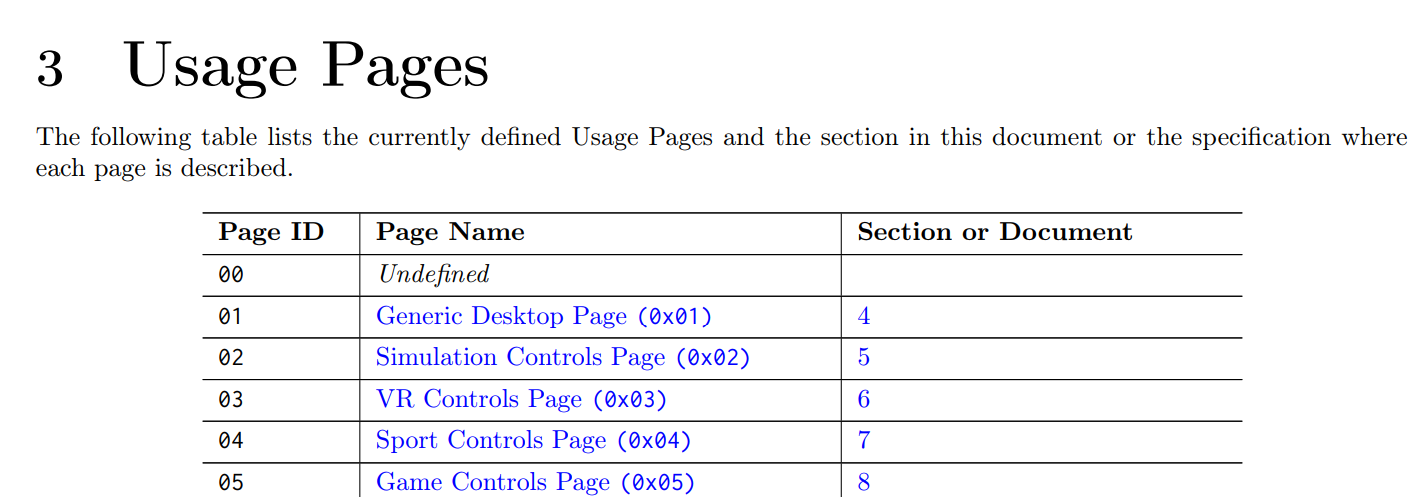
Explication of Short item of size 1. Local type. Usage tag. Value : 2
Next, a Local item tagged as Usage is used (Short item of size 1. Local type. Usage tag. Value : 2). Since the value is 2, it indicates that the device is a mouse:
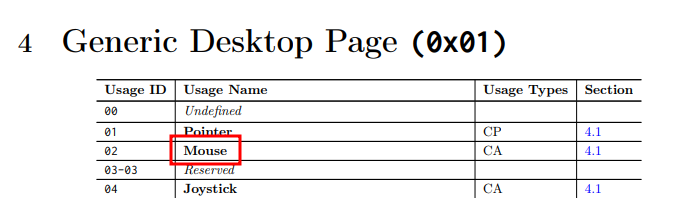
The previous figure shows that the Usage Type for the mouse is CA, which stands for Collection Application according to the USB HID Usage Tables specification:

Explication of Short item of size 1. Main type. Collection tag. Value : 1
The 'USB Device Class Definition for Human Interface Device (HID)' specification provides the values that a Collection can take:
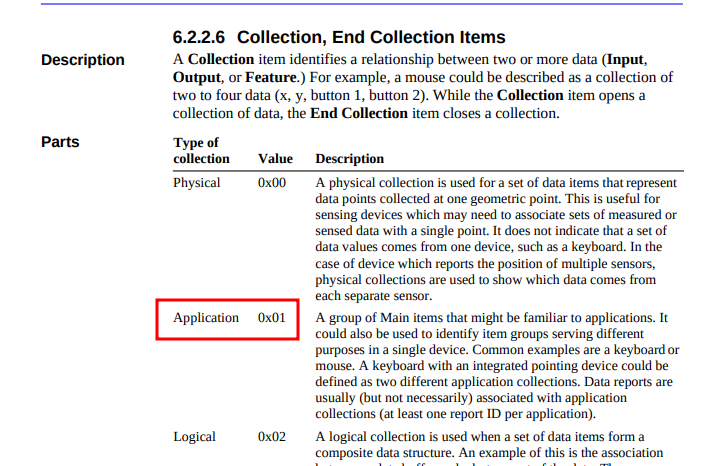
This explains that we have a Short item of size 1, Main type, Collection tag, Value: 1.
As shown in the latest figure, an application collection is 'a group of Main items.'
As far as I understand, this means a collection must contain one or more Main items, but it doesn't exclude the possibility of including Global or Local items.
This is further described in the 'Device Class Definition for Human Interface Devices (HID)':
Collection item tag: A meaningful grouping of Input, Output, and Feature items—for example, mouse, keyboard, joystick, and pointer.
A group of Main items that might be familiar to applications
The 'USB Device Class Definition for Human Interface Device (HID)' specification provides an example:"
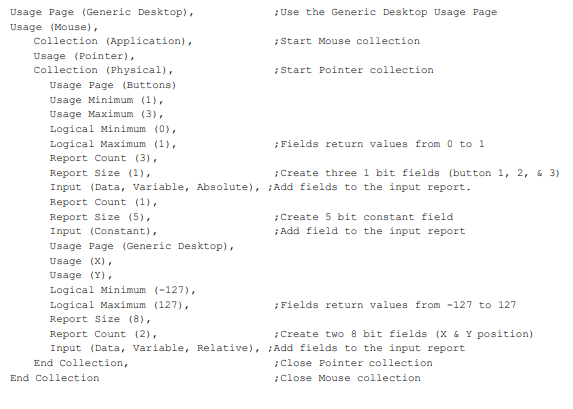
Explication of Short item of size 1. Global type. Report ID tag. Value : 2
Since an HID descriptor can describe devices with multiple features (such as a mouse and a keyboard), the report ID is used to distinguish between these features.
When the device sends information to the computer, it includes the value of this report ID, allowing the computer to identify which feature corresponds to the sent data.
Internal
Let's now focus on the internal items:
        Short item of size 1. Global type. Usage Page tag. Value :  9 -> Button Page from 1 to 3 (souris a 3 boutons)
		Short item of size 1. Local type. Usage Minimum tag. Value :  1
		Short item of size 1. Local type. Usage Maximum tag. Value :  3
		Short item of size 1. Global type. Logical Minimum tag. Value :  0
		Short item of size 1. Global type. Logical Maximum tag. Value :  1
		Short item of size 1. Global type. Report Size tag. Value :  1
		Short item of size 1. Global type. Report Count tag. Value :  3
		Short item of size 1. Main type. Input tag. Value :  2
		Short item of size 1. Global type. Report Size tag. Value :  5
		Short item of size 1. Global type. Report Count tag. Value :  1
		Short item of size 1. Main type. Input tag. Value :  1

		Short item of size 1. Global type. Usage Page tag. Value :  1 -> Generic Desktop page
		Short item of size 1. Local type. Usage tag. Value :  30 -> X
		Short item of size 1. Local type. Usage tag. Value :  31 -> Y
		Short item of size 1. Local type. Usage tag. Value :  38 -> Wheel
		Short item of size 1. Global type. Logical Minimum tag. Value :  81
		Short item of size 1. Global type. Logical Maximum tag. Value :  7f
		Short item of size 1. Global type. Report Size tag. Value :  8
		Short item of size 1. Global type. Report Count tag. Value :  3
		Short item of size 1. Main type. Input tag. Value :  6
Here again, there are two parts that describe:
- The buttons of the mouse in the first part
- The axes in the second part
Note that each part begins with a Global item, tagged as a Usage Page:
Short item of size 1. Global type. Usage Page tag. Value : 9Short item of size 1. Global type. Usage Page tag. Value : 1
Note that each part begins with a Global item, tagged as a Usage Page:
Let's focus on the first part:
        Short item of size 1. Global type. Usage Page tag. Value :  9 -> Button Page from 1 to 3 (souris a 3 boutons)
		Short item of size 1. Local type. Usage Minimum tag. Value :  1
		Short item of size 1. Local type. Usage Maximum tag. Value :  3
		Short item of size 1. Global type. Logical Minimum tag. Value :  0
		Short item of size 1. Global type. Logical Maximum tag. Value :  1

		Short item of size 1. Global type. Report Size tag. Value :  1
		Short item of size 1. Global type. Report Count tag. Value :  3
		Short item of size 1. Main type. Input tag. Value :  2 ---> First Input

		Short item of size 1. Global type. Report Size tag. Value :  5
		Short item of size 1. Global type. Report Count tag. Value :  1
		Short item of size 1. Main type. Input tag. Value :  1 ---> Second input
Since the Usage Page value is 9, this corresponds to a 'Button Page.' It will describe the buttons of the mouse.
Finally, there are three pairs that describe the buttons:
- The items tagged 'Usage Minimum' and 'Usage Maximum' define the range of the buttons. Since the values are 1 and 3, it means there are three buttons (button 1, button 2, and button 3).
- The items tagged 'Logical Minimum' and 'Logical Maximum' define the values each button can take. Here, the values are 0 and 1, which can be interpreted as 'button released' and 'button clicked,' respectively.
- The items tagged 'Report Size' and 'Report Count' represent the size of an element to send and the number of elements, respectively.
References
Bluetooth Core Specification
Bluetooth HUMAN INTERFACE DEVICE PROFILE 1.1
Bluetooth Assigned Numbers https://www.bluetooth.com/wp-content/uploads/Files/Specification/HTML/Assigned_Numbers/out/en/Assigned_Numbers.pdf?v=1726177615930
Bluetooth Device identification profile specification
Bluetooth HID Lite https://www.bluetooth.com/wp-content/uploads/2023/08/HID-Lite-WP-V10.pdf
Bluetooth HUMAN INTERFACE DEVICE (HID) PROFILE http://rfc.nop.hu/bluetooth/HID_SPEC_V10.pdf
USB Device Class Definition for Human Interface Devices (HID) https://www.usb.org/sites/default/files/hid1_11.pdf
USB HID Usage Tables For Universal Serial Bus (USB) https://www.usb.org/sites/default/files/hut1_5.pdf
https://gist.github.com/scientificRat/be2bbac0769bfa04820bc73edc009bdf
https://github.com/torvalds/linux/blob/master/net/bluetooth/lib.c
https://github.com/bluez/bluez/blob/master/doc/org.bluez.ProfileManager.rst
https://stackoverflow.com/questions/34709583/bluetoothctl-set-passkey
https://stackoverflow.com/questions/21606991/custom-hid-device-hid-report-descriptor
https://programel.ru/files/Tutorial about USB HID Report Descriptors _ Eleccelerator.pdf
https://docs.silabs.com/protocol-usb/1.2.0/protocol-usb-hid/
1 https://github.com/torvalds/linux/blob/master/net/bluetooth/lib.c
4 https://programel.ru/files/Tutorial about USB HID Report Descriptors _ Eleccelerator.pdf
5 https://stackoverflow.com/questions/65497619/making-linux-into-a-bluetooth-keyboard-hid
6 https://docs.silabs.com/protocol-usb/1.2.0/protocol-usb-hid/